This blog is a second blog in the GraphQL series. In the first blog, we have seen the changes which GraphQL has brought from the days of RESTful service.
In this blog, we will see a working demo of a GraphQL service where we will cover things like
- Resolvers
- Queries
- Mutations
- GraphiQL
These things will get you started on your journey of mastering GraphQL. I would suggest you follow the blog and create your own code to fully understand the things which I am covering. I have also placed the complete code on my Github repo so you can use that as well.
Let’s start and understand what we are building today. We will be building a “Library” system where we will be fetching a list of books and also we will be able to add new books to our library.
The technologies which I will be using for this are Spring and SPQR. SPQR is a java library that provides us a code-first approach of creating our GraphQL system. In a code first system, we first write code and using markers/annotations we will tell the system to come up with the GraphQL schema.
This helps in maintaining a single source of truth. You will see the benefit of such a system especially for a typed language like Java.
DEMO
NOTE: In addition to the code, I am explaining here, there is some more glue code that is required to integrate GraphQL with Micronaut. This code is specific to Micronaut and SPQR and so I will not be explaining it explicitly. The idea here is to cover and explain the concepts around GraphQL and so in case you are using any other library/framework just read the manual to kick start your GraphQL server.
Entity
We will be fetching/adding books and so we need an entity class for our book entity.
Book {
    private UUID id;
    private String name;
    private String author;
    private String category;
}
Repository
Our repository is just a data store for storing books. You can replace this sample repository code with any data store.
public class BooksRepository {
    private Map<UUID, Book> books;

    public BooksRepository() {
        Book book1 = new Book();
        book1.setName("The Unicorn Project");
        book1.setAuthor("Jhon Doe");
        book1.setCategory("Fiction");

        Book book2 = new Book();
        book2.setName("Head First Java");
        book2.setAuthor("Tom Lee");
        book2.setCategory("Computers");

        this.books = new HashMap<>();
        books.put(book1.getId(), book1);
        books.put(book2.getId(), book2);
    }

    public Map<UUID, Book> getBooks() {
        return books;
    }
}
Service
This is the business layer of our library system which interacts with our repository.
@Singleton
public class BookService {

    @Inject
    BooksRepository booksRepository;

    public Book getBook(String id) {
        return booksRepository.getBooks().get(id);
    }

    public List<Book> getAllBooks() {
        List<Book> result = new ArrayList();
        result.addAll(booksRepository.getBooks().values());
        return result;
    }
}
RESOLVERS
In a GraphQL system, this is the layer that will be invoked by the client requests. You can compare these resolvers to your controllers in the Restful world. In the following sections, I have shown both a query resolver and a mutation resolver.
Query Resolvers
Query in GraphQL is an operation that returns some data. For Example, below is a sample query that returns all available books in our repository.
Get All Books
@GraphQLQuery(name="getBooks", description="Get all books")
public List<Book> getBooks() {
    return bookService.getAllBooks();
}
Get Book with a specific Id
The below examples show how to pass arguments while calling our queries.
@GraphQLQuery(name="getBook", description="Get all books")
public Book getBook(@GraphQLInputField String id) {
    return bookService.getBook(id);
}
Mutation Resolvers
Mutations, as the name suggests, are the operations that update the state.
Add Book
@GraphQLMutation(name="addBook", description = "Add a new book")
public void addBook(Book book) {
    bookService.addBook(book);
}
Once our code is complete, we will integrate GraphiQL and will test out our resolvers.
GraphiQL
GraphiQL is a powerful tool that we can use to run our queries and mutations Once configured we can then visit http://<url>:<port>/<GraphiQL path> to access it. Few nice features of GraphiQL are:
- Documentation for Queries and Mutations
- Auto-suggest while executing queries.
Below is a sample Micornaut configuration that is required to configure GraphiQL. Other frameworks should have a similar configuration.
graphql:
  enable: true
  path: graphql
  graphiql:
    enabled: true
    version: 0.13.2
    path: /graphiql
    template-path: classpath:graphiql/index.html
    template-parameters:
    page-title: DemoGraphiQL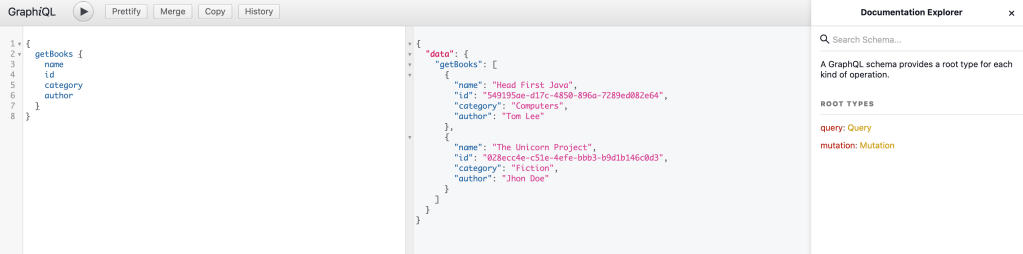
We are all set now. Lets run some queries to see the power of GraphQL.
Sample Query
{
    getBooks {
      id
      name
      category
      author
    }
}
We can add and remove any book’s attribute in the query and the server will then remove the corresponding attribute from the response. This is the querying capability of GraphQL which we are discussing since our first blog in GraphQL series.
Now try to come up with the mutation query to add a new book. I am sure with auto suggest feature in GraphiQL you will be able to do it in a few seconds.
I hope this will help you in starting with your journey with GraphQL. In the next blog in my GraphQL series, I will try to show even more complex concepts in GraphQL so please stay tuned. As always try the things which we have covered and please share the feedback.
 Pulkit Gupta